
大家好,
描述:
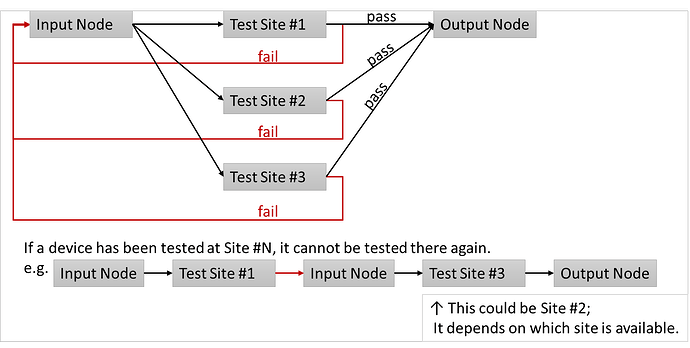
设备从输入节点流入系统,经过一个或多个测试站点,最终根据以下规则在输出节点流出:
- 如果设备在到达终点前测试失败,必须重新测试。
- 设备不能使用已经访问过的测试站点。
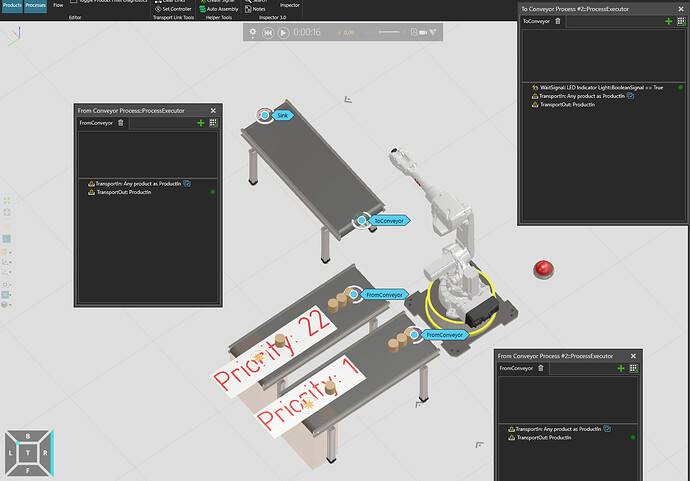
系统物料流如下所示:
问题:
在描述我尝试过的方法之前,我先澄清一下我的问题。
- 要屏蔽具有特定属性值的产品,您可以通过以下几种方式实现,具体方法取决于您使用的平台或系统: ### 1. **电商平台或内容管理系统(如 Shopify、Magento、WordPress/WooCommerce)** - **使用筛选或排除规则**:在商品列表或搜索功能中,设置规则排除特定属性值(如颜色、尺寸、品牌)。 - **修改主题代码**:通过编辑模板文件,添加条件判断来隐藏符合条件的产品。 - **使用插件或扩展**:安装第三方工具(如 Shopify 的“Product Filter & Search”),通过配置屏蔽特定属性。 ### 2. **数据库操作** - 如果产品信息存储在数据库中,可以通过 SQL 查询筛选或隐藏特定属性值的数据: ```sql UPDATE products SET status = 'hidden' WHERE attribute = '特定值'; ``` ### 3. **自定义开发** - 在网站或应用的前端/后端代码中添加逻辑,检查产品属性并动态隐藏符合条件的商品。 ### 4. **广告或推荐系统** - 在广告平台(如 Google Ads、Facebook Ads)中,设置排除规则,避免推广特定属性的产品。 ### 5. **第三方工具或脚本** - 使用数据管理工具(如 Excel、Python 脚本)批量处理产品数据,标记或删除特定属性值的产品。 ### 注意事项: - **备份数据**:在进行批量修改或代码调整前,务必备份数据库或文件。 - **测试效果**:在正式应用前,先在小范围内测试确保规则正确生效。 - **平台差异**:不同平台的具体操作可能不同,请参考相关文档或寻求技术支持。 如果您能提供更多细节(如使用的平台、具体属性值),我可以给出更针对性的建议!
- 我该如何管理匹配到的内容?需要和饲料如何使用Python API建立连接?
- 此外,是否可以创建一个自定义的vcProductFilter一个允许我们根据自定义逻辑来接受或拒绝产品实例的对象是什么?
我尝试过的方法是...
根据 VC Help 文档中关于产品匹配器上面写着:
如果需求方和供给方的流程组ID匹配,且需求方接受供给方的产品类型,即可完成匹配。(定义于vcProductFilter中),并且运输节点之间存在有效的运输解决方案。
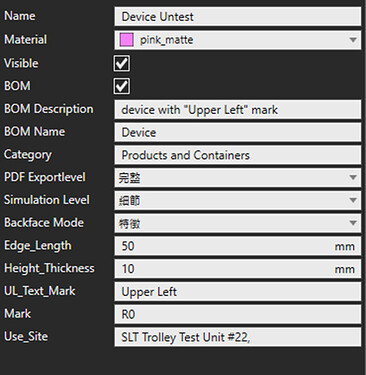
基于此,我尝试在属性上创建一个名为 **Use_Site**的属性。设备用于记录已使用的测试站点。
接着,我设置了一个产品筛选器在每个站点的流程声明中。
但我不确定如何编写正确的表达式,甚至不知道该使用哪种类型的筛选器。
筛选器表达式似乎不允许类似"str" not in "str"这样的语法。
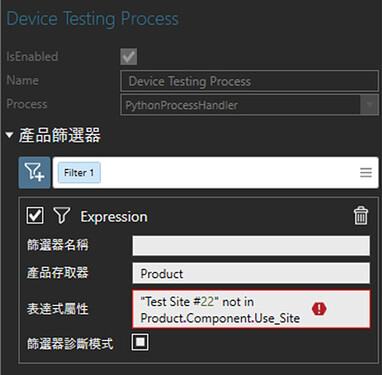
我在声明筛选器使用的表达式中遇到了一个错误。错误信息如下所示:
Error in . Expression '"Test Site #22" not in Product.Component.Use_Site' refers to the variable itself.
我也尝试通过 Python API 处理需求 / 匹配的问题。
我调用了match.tryCancelMatch(),但它返回了None,并且匹配状态仍保持在创建状态。
嗯……看来匹配无法按预期取消。
def register_match(new_):
  """
  Register a match event for need/feed and handle the match logic.
  """
  def need_feed_match(match):  # type: (vcProductNeedFeedMatch) -> Any
    transport_ = next(x for x in transport_items if x.need_item == new_ or x.feed_item == new_) # type: TransportItem
    if not transport_:
      error('No TransportItem found!')
      return
    #mo
    print("==========================================")
    if match.State == VC_MATCH_STATE_CREATED:
      match_state = "Created"
    elif match.State == VC_MATCH_STATE_CANCELLED:
      match_state = "Cancelled"
    elif match.State == VC_MATCH_STATE_FINALIZED:
      match_state = "Finalized"
    elif match.State == VC_MATCH_STATE_DISPOSED:
      match_state = "Disposed"
    print("This Match Object Type: {}".format(match_state))
    print("Matched Need's "
          "Target Node: {}".format(match.MatchedNeed.TargetNode.Component.Name))
    print("Matched Feed's "
          "Source Node: {}".format(match.MatchedFeed.SourceNode.Component.Name))
    print("Matched Product Instance:\n\t"
          "Product's Mark: {}\n\t"
          "Product's Used Site: {}".format(match.MatchedFeed.Product.Component.Mark,
                                         match.MatchedFeed.Product.Component.Use_Site))
    if comp.Name in match.MatchedFeed.Product.Component.Use_Site and transport_.type == 'need':
      print("This matched need feed should be canceled!")
      print(match.tryCancelMatch())
      print("This Match Object Type: {}".format(match_state))
      print("==========================================")
      return
    else:
      print("==========================================")

    transport_.need_item = match.MatchedNeed
    transport_.feed_item = match.MatchedFeed
    transport_.match_item = match
    transport_.match_time = sim.SimTime
    transport_.product = match.MatchedFeed.Product
    create_transport_target(transport_, match.MatchedFeed.Product, transport_.type)
    if transport_.type == 'feed':
      solution = transport_system.findSolution(
        transport_.feed_item.SourceNode,
        transport_.need_item.TargetNode,
        transport_.product.ProductType.FlowGroup
      )
      transport_.product.TransportSolution = solution
      transport_node.beginTransportOut(transport_.product)
    match.finalizeMatch()
  return need_feed_match
VC OUTPUT PANEL:
==========================================
This Match Object Type: Created
Matched Need's Target Node: SLT Trolley Test Unit #22
Matched Feed's Source Node: PlatformBase
Matched Product Instance:
	Product's Mark: R0
	Product's Used Site: SLT Trolley Test Unit #22,
This matched need feed should be canceled!
None
This Match Object Type: Created
==========================================
 或者可能需要重新构思模型架构。

 微信扫一扫,打赏作者吧~
网友评论
最新评论