TSy 2023年10月19日 下午1:401
Python 接口定义存根/模块(.pyi 文件)是一种标准化方式,用于描述可通过 Python 访问但并非以 Python 代码实现的 API。这些文件可以包含类型信息,像安装了 Python 扩展的 Visual Studio Code 这类高级 Python 编辑器可以利用这些信息,提供非常智能的自动补全和静态类型检查。
我基于最新的在线帮助文档,为 VC 4.8 Premium 的 API 制作/生成了完整的 pyi 定义。
这是一个在 Visual Studio Code 中使用这些定义(以 Pylance 作为类型检查器)的(无声)演示。
功能:
-
包含在线帮助文档中描述的所有 Python 类及其成员(属性、方法、构造函数、事件)以及常量。
-
在可能的情况下包含准确的类型信息。
-
包含描述和指向在线帮助文档的直接链接。
-
模块组织方式与 VC 类似,可以导入来自 vcScript、vcCommand、vcVector 等的函数。
注意事项:
-
对于某些基类(如 vcBehaviour)的定义,必须包含可能仅存在于部分行为中的属性。这些属性在描述中已添加注释。
-
类型检查器已不再真正支持 Python 2,因此它们会提示 print 语句和类型间赋值的问题,因为无法使用类型转换。
-
动态创建的属性无法被识别,因此不会被包含在内。
如何在 Visual Studio Code 中使用
-
下载并解压 pyi 文件到合适的位置。
-
安装 VS Code、Python 扩展和 Pylance 扩展。
-
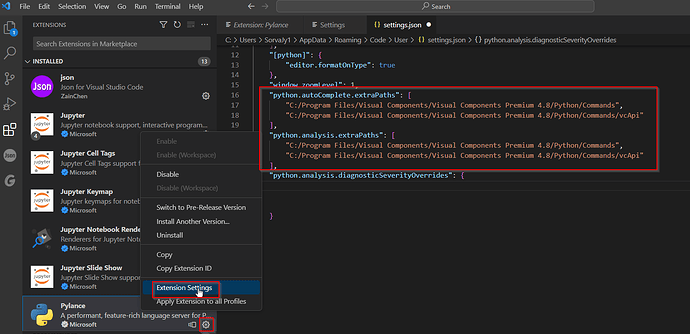
将 pyi 模块文件夹添加到 “python.autoComplete.extraPaths” 和 “python.analysis.extraPaths” Python 扩展的设置中。配置 VC
-
以使用 VS Code 作为外部 Python 编辑器。从 VC 打开 Python 脚本,配置 VS Code 信任文件夹路径以启用所有编辑器功能。
-
在 VS Code 中启用类型检查。
-
从此处下载文件:
vcApi VC48.zip
(146.6 KB) 15 个赞
Python 脚本中外部库的自动补全
在哪里找到 "vcCommand" 文件
ChatGPT 作为 VC Python API 的编程助手——有人有更好的经验吗?
带自动补全的集成编辑器
缓冲区资源位置根据放置位置变化
Buffer resource location changing based on placement location
Este 2023年10月20日 上午8:052
太棒了!我将 vcApi 文件夹解压到了我的 VC 安装目录下的 Python - Commands 文件夹中。我就是这样修改了 Pylance 设置并让它成功运行了。
pylance_settings1566×760 86.9 KB
4 个赞
ProLean 2023年10月23日 下午2:333
line_out 2024年4月18日 上午5:534
在尝试了几个小时让这个在我的新机器上运行后,我终于搞定了
-
首先按照主帖中的说明操作。
-
如果你懒得看那么多内容,就像 @Este 评论中描述的那样,把那些东西放到安装文件夹里。
2a) 我把路径字符串贴在这里,这样你就不需要替换所有的斜杠了:"C:/Program Files/Visual Components/Visual Components Premium 4.8/Python/Commands/vcApi"
-
这是我的窍门: 在 Visual Studio Code 中设置工作区,设置一个工作区让自动补全功能开始工作了。我直接选择了我的 C 盘。
ZF_DJ 2024年5月7日 上午7:395
大家好!
非常感谢!这太棒了。
我对 Visual Code 和在 VC 中使用 Python 编程还比较陌生,自动补全功能帮了大忙!
请问在 Visual Code 中是否能够跟踪程序的执行过程?
Lefa 2024年5月7日 下午12:596
你好,
我不太确定是否可以通过外部编辑器跟踪执行过程,但内置的编辑器是可以做到的。
祝好,
Lefa
TSy 2024年12月11日 下午12:217
已更新以匹配 VC 4.10.0 版本的 Python API
vcScript VC 410.zip (148.0 KB)
部分 AI 生成的差异摘要:
以下是 vcApi.pyi 文件在 4.8 和 4.10 版本之间的主要变化:
-
新增属性和方法:
-
vcApplication:
-
新增 布局可视化设置 属性。
-
新增SimulationWorld属性。
-
vcBehaviour:
-
新增带 getter 和 setter 的Visible属性。
-
vcLayout:
-
新增包含以下属性的新类:ChildLayouts、ParentLayout、Visualization
-
新增方法:Clone、MoveChildrenFrom
-
vcLayoutVisualization 和 vcLayoutVisualizationSettings:
-
vcLight:
-
deleteLight方法现在接受vcLight对象,而不是字符串名称。
-
vcProcessController:
-
vcPythonProcessHandler:
-
已更新condition和triggerCondition方法,使其接受Callable[[], None]而非Callable[[], bool]。
3 个赞
asirit 2026年2月5日 下午11:178
有人能告诉我如何解决这个 vcApplication 智能感知问题吗?
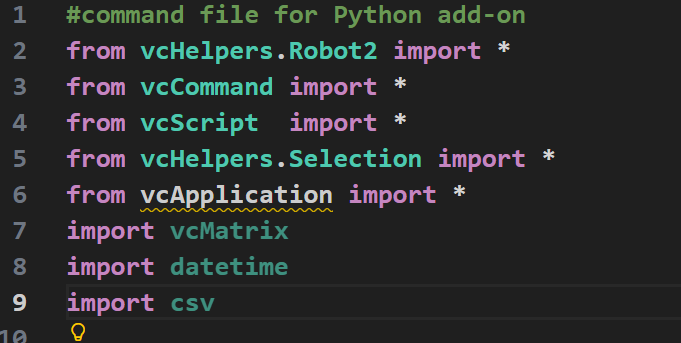
image681×343 26.3 KB
TSy 2026年2月6日 上午6:209
我认为导入无法解析是因为在这些 API 文件中,vcApplication并未被定义为一个单独的模块,其类定义位于vcScript中。
可能需要创建一个单独的vcApplication.pyi文件,该文件包含静态模块级成员,并且需要一个空文件夹才能实现直接导入。
你或许可以直接在代码中使用vcApplication前缀,例如vcApplication.loadBitmap(...)。


 微信扫一扫,打赏作者吧~
网友评论
最新评论